We provide premium cPanel hosting!
  • Contact
  • View Cart (0)
  • Client Logon
Your Company Logo
  • Domains
    Register Domain
    Your very own website address
    Transfer Domain
    Move your domain to LDR Web Hosting

    Hundreds of customer's around the world trust LDR Web Hosting to manage their domain. We provide freedom and control including full access & the ability to move/sell your domains.

  • Web Hosting
    Web Hosting
    Reliable and fast hosting
    Web Design
    Hire LDR Design Agency to build your website

    We provide a wide range of services for your business including Web Hosting, Dedicated Servers, VPNs & more.

  • Extras
    Website Security
    Keep your website safe & secure
    SEO Tools
    SEO report with optimization steps
    Professional Email
    Powerful email and productivity
    SocialBee
    Manage your social media
    LDR PBX
    A professional phone system

    Enhance your website with these extras including our website backup & security services.

  • Company
    LDR Web Hosting
    Learn more about LDR Web Hosting
    Announcements
    Get up to date with the latest news

    Learn more about what makes LDR Web Hosting the best choice for web hosting services.

  • Support
    Contact Form
    Contact our pre-sales department
    Submit Ticket
    Contact our support via ticket
    Knowledgebase
    View our vast documentation

    If you have a pre-sale question or issue with your website we are here to help.

  • Order

Knowledgebase

Portal Home > Knowledgebase > Mobile > Android > How to Fetch - Sync Emails in Android

  Categories

Backup/Restore
4
cPanel - Control Panel
24
Databases
11
DNS - Nameservers
6
Domain Management
10
Email
17
FTP
9
Mail Filters & SPAM
8
Mobile
11
Others
3
PayPal
7
Security
10
Softaculous
69
SSL
5
WordPress
17

  Categories

  Support

My Support Tickets
Announcements
Knowledgebase
Downloads
Network Status
Open Ticket

How to Fetch - Sync Emails in Android Print

  • 0

We hope you have already read our tutorial on How to Set Up a cPanel Email Account in Android, and you have already added a built-in email widget to your Android screen.


1.
Press on Inbox.
android-email-icon-cpanel.gif


2. Pull down from the top of the screen until the little refresh wheel start spinning. It will start syncing emails.
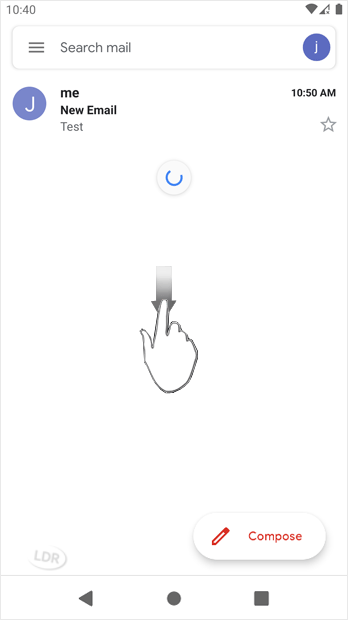
android-swipe-down-refreshemail-cpanel.gif

In the above screenshot, after syncing, we have received a new email.


Was this answer helpful?

Related Articles

How to Send an Email via Android We hope you have already read our tutorial on How to Set Up a cPanel Email Account in Android,... How to Set Up a cPanel Email Account in Android You can add a cPanel email account to your Android's built-in email application. You don't need... How to Read cPanel Emails in Android Suppose you have already added your cPanel email accounts to your Android built-in email... How to Delete cPanel Emails in Android We hope you have already read our tutorial on How to Set Up a cPanel Email Account in Android,... How to Set Up an Email Signature in Android We hope you have already read our tutorial on How to Set Up a cPanel Email Account in Android,...
« Back

Powered by WHMCompleteSolution

  Support

My Support Tickets
Announcements
Knowledgebase
Downloads
Network Status
Open Ticket
People trust LDR Web Hosting
Join them today
Services
  • Web Hosting
  • Web Design
Extras
  • Website Security
  • SEO Tools
  • Professional Email
Domains
  • Register Domain
  • Transfer Domain
Company
  • LDR Web Hosting
  • Announcements
Support
  • Contact Form
  • Submit Ticket
  • Knowledgebase
9624 Cincinnati Columbus Rd Suite 210
sales@ldrwebsites.com
+1-513-926-9560
Follow LDR Web Hosting
LDR Web Hosting Facebook
LDR Web Hosting Twitter
LDR Web Hosting Google
LDR Web Hosting LinkedIn
LDR Web Hosting © 2025 | All rights reserved

Loading...
Loading...

Generate Password

Please enter a number between 8 and 64 for the password length
LDR Web Hosting Facebook
LDR Web Hosting Twitter
LDR Web Hosting Google
LDR Web Hosting LinkedIn